
Best Dot Crosshairs in Valorant (With Codes & Setup Guide)
 Jettor
Best Dot Crosshairs in Valorant (With Codes & Setup Guide)
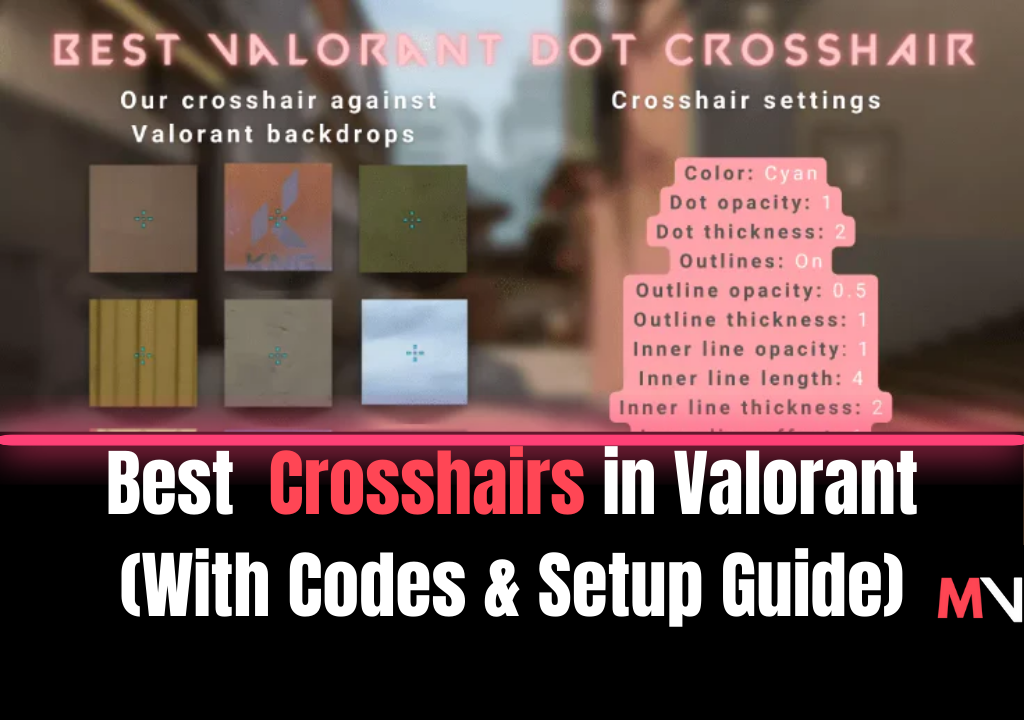
Dot crosshairs are among the most precise aiming reticles you can use in Valorant. Minimalistic and clean, they offer clear visual focus for lining up pixel-perfect shots—ideal for players who rely on accuracy and headshot consistency. Whether you’re a Vandal one-tap specialist or simply want a cleaner aiming experience, switching to a dot crosshair can help sharpen your mechanics.
Below, we break down the best Valorant dot crosshairs, how to import them instantly, and how to build your own for competitive play.
Top Dot Crosshair Codes in Valorant
Try out these optimized dot crosshairs to find the perfect match for your playstyle. Copy the code and import it directly into Valorant.
Square Dot Crosshairs:
- 🔴 Red Square Dot:
0;s;1;P;c;7;u;FFFF00FF;o;1;d;1;z;3;0b;0;1b;0 - 🟢 Green Square Dot:
0;s;1;P;c;1;u;FFFF00FF;o;1;d;1;z;3;0b;0;1b;0 - 🔵 Cyan Square Dot:
0;s;1;P;c;5;u;FFFF00FF;o;1;d;1;z;3;0b;0;1b;0
Round Dot Crosshairs:
- 🔴 Red Round Dot:
0;s;1;P;c;7;h;0;d;1;z;3;f;0;0t;3;0l;1;0o;1;0a;1;0f;0;1t;0;1l;0;1o;0;1a;0;1f;0 - 🟢 Green Round Dot:
0;s;1;P;c;1;h;0;d;1;z;3;f;0;0t;3;0l;1;0o;1;0a;1;0f;0;1t;0;1l;0;1o;0;1a;0;1f;0 - 🔵 Cyan Round Dot:
0;s;1;P;c;5;h;0;d;1;z;3;f;0;0t;3;0l;1;0o;1;0a;1;0f;0;1t;0;1l;0;1o;0;1a;0;1f;0
How to Import a Crosshair Code in Valorant
- Launch Valorant and click the gear icon in the top-right corner.
- Go to Settings > Crosshair tab.
- Click the Import Profile icon (the downward arrow).
- Paste your desired code and click Import.
You’ll instantly see the crosshair change and can begin testing it in practice or deathmatch modes.
What Is a Dot Crosshair in Valorant?
A dot crosshair is a highly simplified reticle that uses a single point at the center of the screen to indicate your shot placement. This minimalist design removes visual clutter and helps with aim consistency—especially for players focusing on precise headshots and disciplined recoil control.
Pro players often use dot or dot-like crosshairs for their ability to support muscle memory and promote better shot discipline.
Create Your Own Dot Crosshair – Settings
Prefer to customize from scratch? Here’s how to build your own dot crosshair manually in Valorant.
Square Dot Settings:
Outlines: On (optional)
Outline Opacity: 1
Outline Thickness: 1
Center Dot: On
Center Dot Opacity: 1
Center Dot Thickness: 3
Inner Lines: Off
Outer Lines: Off
Round Dot: import one of the Round Dot codes above, then fine-tune its size with Center Dot Thickness and the inner line values in the Crosshair tab. Each change shows in the preview right away, so adjust one value at a time until it looks right on your screen.
Experiment with color settings using the Custom Color option to tailor your reticle for different background visibility (e.g., brighter colors for dark maps).
Tips for Using Dot Crosshairs Effectively
- Warm up in Deathmatch or the Range before competitive games to build crosshair familiarity.
- Combine dot crosshairs with low sensitivity settings for enhanced accuracy.
- Avoid excessive crosshair movement—dot crosshairs reward precise flicks and small adjustments.
- Practice one-taps with rifles like the Vandal and Guardian, where dot crosshairs shine the most.
Track Your Aim Consistency with MMRValorant.com
Want to know if your new dot crosshair is improving your aim? Head over to MMRValorant.com to track your performance, MMR trends, and headshot percentage. Whether you're testing new crosshairs or refining your skills, data-driven feedback helps you improve faster and rank up smarter.
Conclusion
Dot crosshairs are a fantastic tool for serious players aiming to sharpen their precision in Valorant. Whether you go for a clean square dot or a refined circular point, finding the right one can elevate your aim and overall confidence in clutch situations. Import one of the top codes above or customize your own to dominate the leaderboard.
Ready to take your aim to the next level? Try a dot crosshair today—and track your improvement with MMRValorant.com!
FAQ
How do I make a dot crosshair in Valorant?
Open Settings > Crosshair, turn Center Dot on, and switch off Inner Lines and Outer Lines. Or import one of the codes above.
How do I make the dot bigger or smaller?
Change Center Dot Thickness in the Crosshair tab. A higher value gives a bigger dot.
Is a dot crosshair good for spraying?
A dot gives no visual feedback on spread, so many players who spray a lot prefer a small cross with movement and firing error turned off. A dot suits players who mostly tap and burst. Try both in the Range before ranked.
Check your Valorant MMR
Type your Riot ID and region — we'll take you to the calculator with everything filled in.
Tags
Author